Filing your Austrian E1kv: a step-by-step guide for IBKR investors
Published: May 2026 · 12 min read · Austrian investors · IBKR · E1kv · FinanzOnline
Visit KapFrei for more information.
The previous post covered why doing Austrian tax reporting by hand is painful — moving average cost basis across years, WHT reclaim, Nichtmeldefonds. This one covers how to use KapFrei to go from broker exports to a filed E1kv form. Three steps, as advertised.
If you haven't read part one, the short version: IBKR doesn't produce an Austrian tax report. KapFrei does.
What you'll have at the end
Before we start, here's what a single run produces in about 10 seconds:
dashboard.xlsx— an Excel file with the E1kv Summary tab pre-filled, plus separate Transactions, Dividends, and Trades sheets with a full audit trailfinanz_online.xml— a FinanzOnline-formatted E1kv XML file (for future direct submission)wht_reclaim.txt— a report of withholding tax you can reclaim from Germany, Denmark, France, and Irelandanv_checklist.txt— deduction reminders for your income tax return (Werbungskosten, Sonderausgaben, etc.)- Several supporting files: transaction log CSV, freedom dashboard, Nichtmeldefonds breakdown
The Excel file is what you'll use most. Every number in it is a live formula — you can click into any cell and see exactly where the figure comes from. No black box.
Step 1: Get access
KapFrei is live at app.kapfrei.at. Register for free — no installation needed.
To get started: register at app.kapfrei.at/register. Questions? Email hello@kapfrei.at.
Step 2: Connect your IBKR account and run
Once you have access, the flow is one click: connect your IBKR account and select the tax year. KapFrei handles everything from there.
What happens in those 10 seconds:
- Auto-fetch: KapFrei fetches today's IBKR Flex data and saves it to your data folder
- Parse: reads every broker export file in your data folder (IB, SAXO, E*Trade)
- FX lookup: fetches ECB exchange rates for every transaction date (cached to disk after the first fetch)
- Cost basis: calculates the gleitender Durchschnittspreis (moving average cost price, § 27a Abs. 4 EStG) across all years
- Tax: applies KESt rules, credits WHT, calculates Nichtmeldefonds AE
- Output: writes seven files to
users/yourname/output/2025/
The terminal shows a summary when it's done:
  KZ 862 (inland dividends + interest) .....EUR     1,613.10
        KZ 863 (foreign dividends + interest) ....EUR    11,422.64
        KZ 891 (domestic losses) .................EUR    -1,107.12
        KZ 892 (foreign losses) ..................EUR    -4,735.24
        KZ 994 (foreign gains) ...................EUR     9,291.87
        KZ 899 (KESt from domestic WHT) ..........EUR       443.60
        KZ 998 (creditable foreign WHT) ..........EUR     1,286.20
        ─────────────────────────────────────────────────────────
        KESt remaining to pay.....................EUR     3,789.03
If you see warnings (cost basis mismatches, missing FX rates), read them — they usually mean a missing prior-year file or a ticker rename that needs a config entry.
Step 3: Read the Excel and file in FinanzOnline
Open users/yourname/output/2025/yourname_2025_dashboard.xlsx. The first tab is E1kv Summary.
The E1kv Summary tab
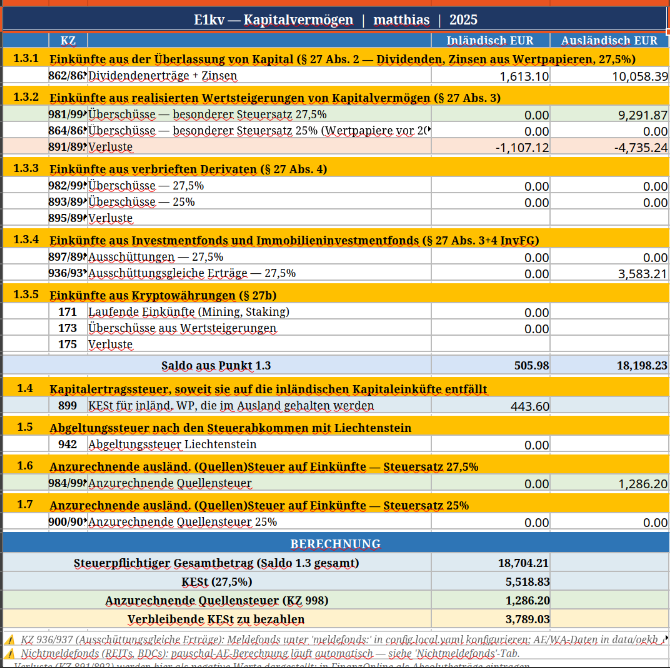
The sheet is divided into five sections matching the official E1kv form:
| Section | What it covers | Key KZ fields |
|---|---|---|
| 1.3.1 | Dividends + interest (27.5% rate) | KZ 862 (domestic), KZ 863 (foreign) |
| 1.3.2 | Capital gains — realised (§27 Abs. 3) | KZ 981/994 (gains), KZ 891/892 (losses) |
| 1.3.3 | Derivatives (§27 Abs. 4) | KZ 982/995, KZ 893/894 |
| 1.3.4 | Investment funds | KZ 897/898 (distributions), KZ 936/937 (AE) |
| 1.3.5 | Crypto (§27b) | KZ 171/173/175 |
Below the KZ fields is the BERECHNUNG section — this is where the tool calculates your net tax:
Steuerpflichtiger Gesamtbetrag (Saldo 1.3)   [sum of all KZ values]
      KESt (27.5%)                                  [× 0.275]
      Anzurechnende Quellensteuer (KZ 998)          [capped at 15% of foreign income]
      Verbleibende KESt zu bezahlen                 [what you actually owe]
Click into any blue cell — it's a formula. The proceeds column references the Trades tab, which references individual transactions. Nothing is hardcoded except the values that can't be derived from broker data (KZ 862/863 include interest that doesn't appear in the Dividends tab, so those are set directly from the Python output).
The other tabs
Before copying numbers into FinanzOnline, spend 2 minutes on the supporting tabs:
- Dividends: every dividend with its WHT, FX conversion, and per-row creditable WHT calculation. The
WHT Creditable EURcolumn applies the 15% treaty cap row by row. The sum goes to KZ 998. - Trades: every buy and sell with moving average cost basis (§ 27a Abs. 4 EStG) and gain/loss. The gain/loss formula is
=EUR proceeds − EUR cost basis. The SUMPRODUCT summary rows feed KZ 891/892/981/994 in the Summary tab. - Freedom: if you've configured it, your FIRE dashboard with portfolio value and projected income.
Filing in FinanzOnline
⚠️ First time with capital gains? Do the Erklärungswechsel first.
If you previously filed an Arbeitnehmerveranlagung (L1), you can no longer use that form once you have capital gains from a foreign broker. You must switch to the Einkommensteuererklärung (E1) — permanently.
The switch takes 2 minutes: Weitere Services → Erklärungswechsel → "Wechsel zur Einkommensteuererklärung" → select income type "Einkünfte aus Kapitalvermögen" → submit. Once processed (usually immediate), the E1 form replaces L1 for all subsequent years.
Important: complete any open Arbeitnehmerveranlagungen for prior years before switching — otherwise those years would also need to be refiled as E1.
Navigate to the E1kv form
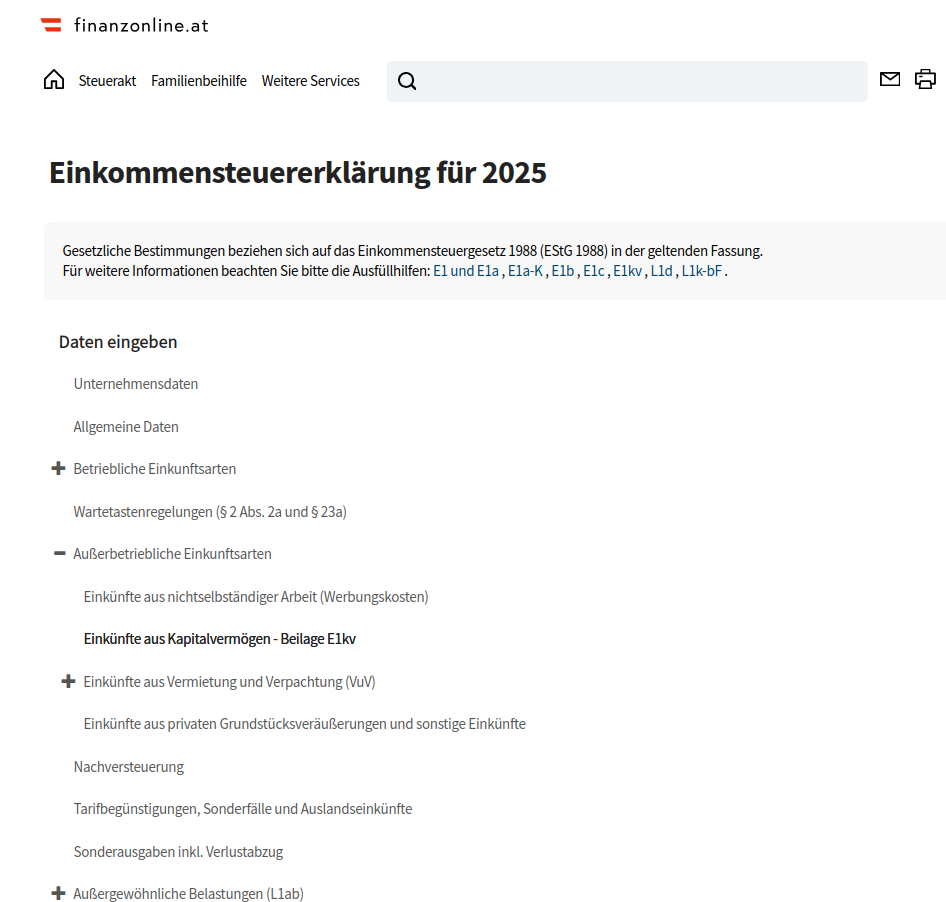
- Log in to finanzonline.bmf.gv.at
- Go to Eingabe → Erklärungen → Einkommensteuererklärung
- Under Außerbetriebliche Einkunftsarten, open Einkünfte aus Kapitalvermögen - Beilage E1kv
The two tabs — which one is yours?
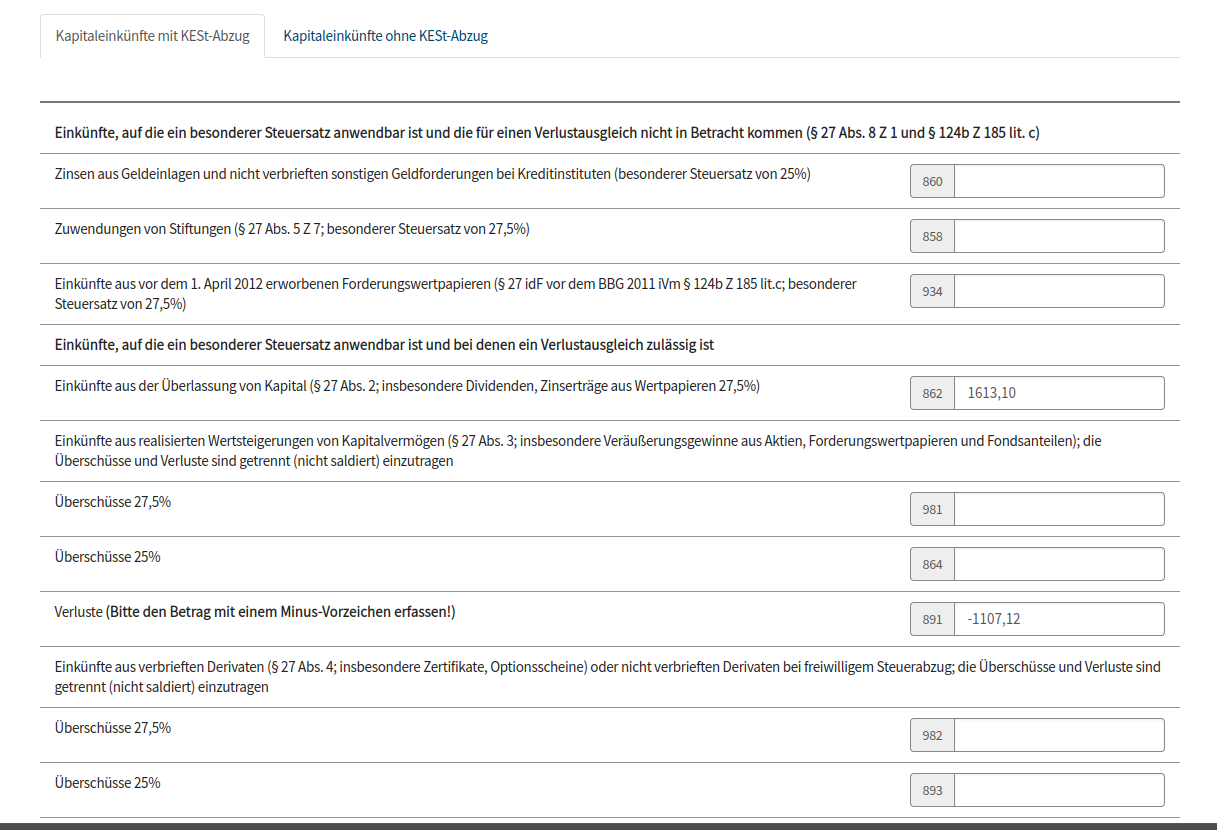
The E1kv form has two tabs. As an IBKR investor, you will fill in fields on both:

"Kapitaleinkünfte mit KESt-Abzug" — for Austrian domestic securities where KESt was already withheld at source (AT-ISIN stocks like Verbund, OMV, etc. held at IBKR):
| KapFrei field | FinanzOnline field | Notes |
|---|---|---|
| KZ 862 | Kennzahl 862 | Inland dividends + interest |
| KZ 891 | Kennzahl 891 | Domestic losses — enter with minus sign |
| KZ 899 | Kennzahl 899 | KESt already withheld on domestic securities |

"Kapitaleinkünfte ohne KESt-Abzug" — for all foreign securities via IBKR (no KESt withheld at source):
| KapFrei field | FinanzOnline field | Notes |
|---|---|---|
| KZ 863 | Kennzahl 863 | Foreign dividends + interest |
| KZ 994 | Kennzahl 994 | Foreign gains |
| KZ 892 | Kennzahl 892 | Foreign losses — enter with minus sign |
| KZ 937 | Kennzahl 937 | Nichtmeldefonds / Meldefonds AE |
| KZ 998 | Kennzahl 998 | Creditable foreign WHT |
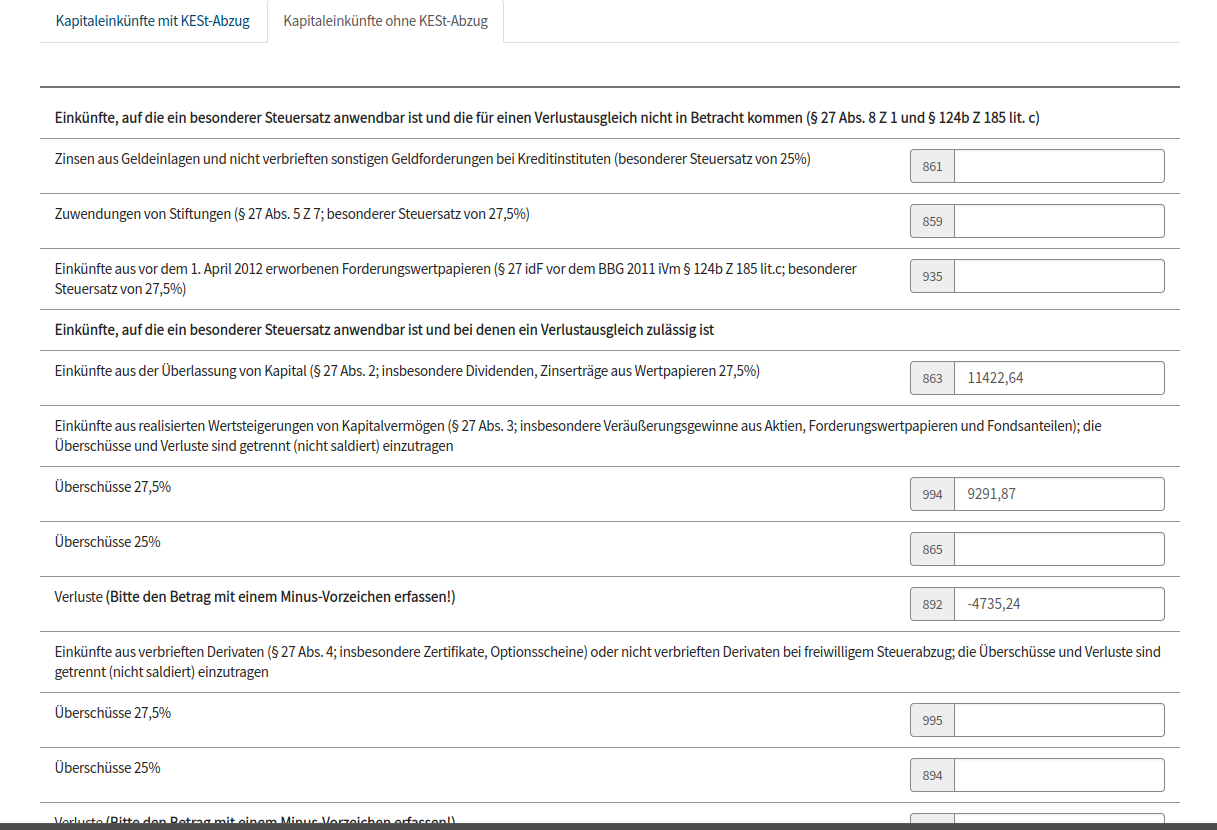
⚠️ Losses require a minus sign. FinanzOnline explicitly asks you to enter losses "mit einem Minus-Vorzeichen" — the field label says so. KZ 891 should be entered as −1107,12, not 1107,12. Same for KZ 892.
What to double-check before submitting
Losses require a minus sign
FinanzOnline explicitly labels loss fields "Bitte den Betrag mit einem Minus-Vorzeichen erfassen!" — enter them as negative numbers (−1107,12, −4735,24). This applies to KZ 891 (domestic losses) and KZ 892 (foreign losses).
KZ 936/937: Meldefonds AE
If you hold any OeKB-registered funds (most Austrian and many European ETFs), the annual ausschüttungsgleiche Erträge go in KZ 936 (domestic) and KZ 937 (foreign). KapFrei fills these in automatically if you've configured your fund ISINs — but the values come from OeKB data you enter manually in data/oekb_ae.yaml. The tool warns you if any entries are missing or still marked as PLACEHOLDER.
If you don't hold any Meldefonds, ignore KZ 936 and KZ 937 entirely.
KZ 937: Nichtmeldefonds AE
If you hold US REITs, BDCs, or other non-OeKB-registered funds (ARCC, OHI, O, EPR, WPC, etc.), KapFrei calculates the §186 InvFG pauschal AE automatically. The amount appears in KZ 937 in the Excel. The Nichtmeldefonds tab shows the breakdown by symbol — check that the year-end prices look right.
The BERECHNUNG number isn't what you pay FinanzOnline
The "Verbleibende KESt zu bezahlen" in the BERECHNUNG section is the net KESt you owe after all credits. But this isn't a direct payment — it's what FinanzOnline calculates after you submit the E1kv. Any overpayment (e.g. if you had KESt deducted at source from an Austrian broker) becomes a refund. Any underpayment becomes a tax bill.
What's not covered yet
A few things fall outside the current scope:
- Meldefonds AE data entry: KapFrei knows the OeKB structure but you need to supply the AE/WA figures from my.oekb.at manually. A future version will automate this.
- Older pre-2011 securities at 25%: KZ 864/865 (gains) and the corresponding loss KZs exist in the tool but are rarely needed for modern portfolios.
- Direct FinanzOnline submission: KapFrei generates the XML file; direct E1 submission from the webapp is on the roadmap. For now, manual entry takes about 5 minutes.
- WHT reclaim filing: KapFrei generates the Cerfa 5001 (France) automatically and produces the reclaim report, but the actual filing is manual. The next blog post covers this end to end.
TL;DR checklist
- [ ] Register at app.kapfrei.at — free
- [ ] Connect your IBKR account → KapFrei fetches your data automatically
- [ ] Download the Excel dashboard → review E1kv Summary tab
- [ ] First time? Do the Erklärungswechsel in FinanzOnline (Weitere Services → Erklärungswechsel)
- [ ] Log in to FinanzOnline → Einkommensteuererklärung → Beilage E1kv
- [ ] "Mit KESt-Abzug" tab: enter KZ 862, 891 (with minus sign), 899
- [ ] "Ohne KESt-Abzug" tab: enter KZ 863, 994, 892 (with minus sign), 937, 998
- [ ] Submit
Questions or edge cases? Email hello@kapfrei.at — I try to answer everything.
KapFrei is a tax calculation tool, not a licensed tax advisor. Results depend on the data you provide and your specific tax situation. Austrian tax law (§27 EStG, InvFG §186) applies.