IBKR · Österreich · KESt

IBKR · Austria · Capital Gains Tax

IBKR Kapitalertragsteuer in Österreich berechnen Calculate IBKR Capital Gains Tax in Austria

Als IBKR-Anleger in Österreich musst du KESt & E1kv selbst berechnen — IBKR führt keine Steuer ab. KapFrei automatisiert den gesamten Prozess: Flex Query hochladen, alle Kennzahlen erhalten, FinanzOnline-XML herunterladen.

As an IBKR investor in Austria you must calculate capital gains tax yourself — IBKR does not withhold it. KapFrei automates the entire process: upload your Flex Query, get all KZ figures, download a FinanzOnline-ready XML.

Jetzt kostenlos berechnen → Calculate for free →

Kostenlos testen · kein Download · kein Steuerberater nötig

Free to try · no download · no tax advisor needed

Warum IBKR-Nutzer die KESt in Österreich selbst berechnen müssen

Why IBKR users must calculate Austrian KESt themselves

Interactive Brokers ist ein Auslandsbroker — er ist in Österreich nicht als steuereinfach registriert. Das bedeutet: IBKR führt keine Kapitalertragsteuer (KESt) an das österreichische Finanzamt ab, und IBKR stellt kein offizielles österreichisches Steuerdokument aus, das du direkt einreichen könntest.

Interactive Brokers is a foreign broker — it is not registered as steuereinfach in Austria. This means IBKR does not withhold Austrian capital gains tax (KESt) and does not produce an official Austrian tax document you could submit directly.

Als österreichischer Anleger bist du daher verpflichtet, alle Kapitalerträge — Dividenden, realisierte Kursgewinne und Zinsen — selbst zu berechnen und über die E1kv-Beilage zur Einkommensteuererklärung in FinanzOnline zu melden. Die Frist für die elektronische Einreichung via FinanzOnline ist der 30. Juni. Eine Verlängerung kann formlos beantragt werden: FinanzOnline → Weitere Services → Erklärungen → Fristverlängerung. Als Grund genügt z.B. „Mehr Zeit zur KESt-Berechnung benötigt."

As an Austrian investor you are therefore required to calculate all capital income — dividends, realised gains and interest — yourself and declare them via the E1kv appendix to your income tax return in FinanzOnline. The FinanzOnline deadline is 30 June. An extension can be requested informally: FinanzOnline → Weitere Services → Erklärungen → Fristverlängerung. Any justified reason is accepted (e.g. "More time needed to calculate KESt").

Achtung — IBKR-Berichte ≠ österreichisches Steuerrecht: Important — IBKR reports ≠ Austrian tax law: IBKR stellt für Österreich keinen offiziellen Steuerbericht bereit. Was du im Portal siehst — „Realized P&L" im Portfolio-Bereich oder FifoPnlRealized im Activity Statement — ist IBKRs interne Berechnung auf FIFO-Basis. Das österreichische EStG §27a Abs. 4 schreibt den gleitenden Durchschnittspreis vor. KapFrei wendet stets die gesetzlich korrekte Methode an. IBKR does not provide an official Austrian tax report. What you see in the portal — "Realized P&L" in the Portfolio view or FifoPnlRealized in the Activity Statement — is IBKR's internal FIFO-based calculation. Austrian tax law (EStG §27a Abs. 4) mandates the moving average cost method. KapFrei always uses the legally correct approach.

Was KapFrei für die E1kv berechnet

What KapFrei calculates for the E1kv

Alle relevanten Kennzahlen — vollständig automatisiert aus deinem IBKR-Export.

All relevant KZ figures — fully automated from your IBKR export.

KZ 862 / 863
Ausländische Dividenden & Zinserträge (§ 27 Abs. 2 & 2a EStG)
Foreign dividends & interest income (§ 27 para. 2 & 2a EStG)
KZ 994 / 892
Realisierte Kursgewinne & -verluste — gleitender Durchschnittspreis (§ 27a Abs. 4 EStG)
Realised capital gains & losses — moving average cost (§ 27a Abs. 4 EStG)
KZ 899 / 998
Quellensteuer-Anrechnung (inländisch / ausländisch), inkl. DBA-Prüfung
Withholding tax credits (domestic / foreign), incl. tax treaty check
KZ 937
Meldefonds-AE (§ 42 InvFG) — OeKB-Daten automatisch
Reporting fund deemed distributions (§ 42 InvFG) — OeKB data automatically
Nichtmeldefonds
Non-reporting funds
Pauschal-AE nach § 186 InvFG (10 % des Jahresendwerts oder 90 % des Jahresgewinns)
Flat deemed income under § 186 InvFG (10% of year-end value or 90% of annual gain)
FinanzOnline XML
Exportfertiger E1kv-Block — Kennzahlen direkt in FinanzOnline übertragen
Export-ready E1kv block — enter KZ figures directly in FinanzOnline
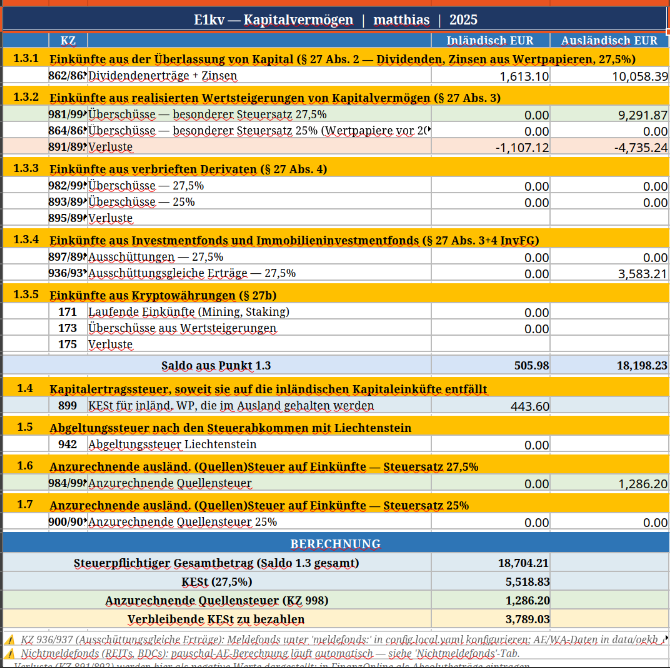
KapFrei E1kv Ergebnis — Kennzahlen 862, 863, 994, 998, 937

KapFrei Ergebnis: alle E1kv-Kennzahlen auf einen Blick, mit Versionsbadge und Berechnungsdatum

KapFrei result: all E1kv figures at a glance, with version badge and calculation date
Schritt für Schritt: IBKR KESt mit KapFrei berechnen

Step by step: calculate IBKR KESt with KapFrei

Von der IBKR App bis zum FinanzOnline-Eintrag — in fünf Schritten.

From the IBKR app to FinanzOnline — in five steps.

1

IBKR Activity Statement herunterladen

Download IBKR Activity Statement

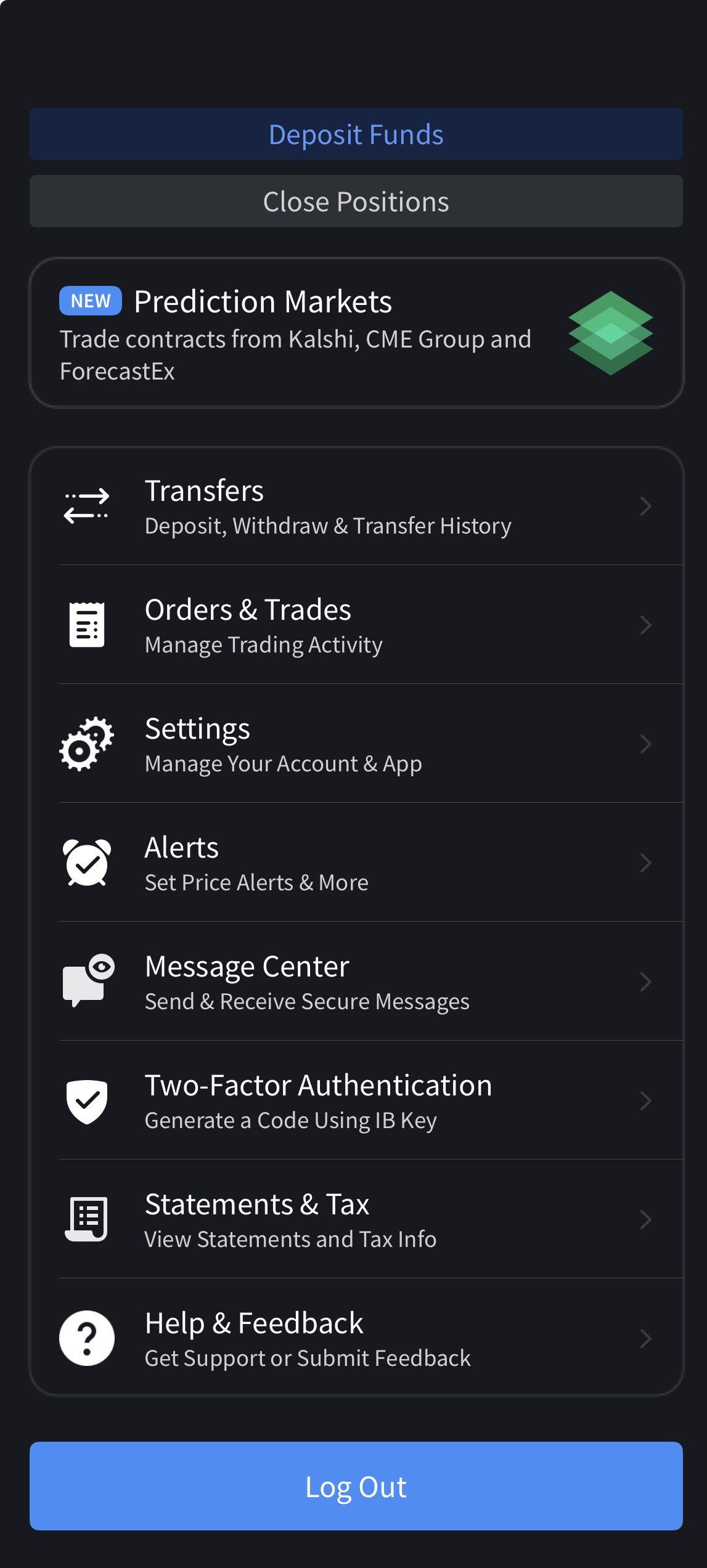
Lade den Standard Activity Statement als CSV direkt aus dem IBKR-Portal herunter: Berichte / Reports → Kontoauszüge / Statements → Aktivität / Activity → Benutzerdefinierter Zeitraum / Custom Date Range → CSV. Kein Flex Query nötig — funktioniert auf Deutsch und Englisch. Für Power-User: optional einen Flex Query mit ISINs und automatischem API-Abruf einrichten — sinnvoll bei AT-Aktien an ausländischen Börsen.

Download the Standard Activity Statement as CSV directly from the IBKR portal: Reports → Statements → Activity → Custom Date Range → CSV. No Flex Query needed — works in German and English. For power users: optionally set up a Flex Query with ISINs and automatic API refresh — useful if you trade AT stocks on foreign exchanges.

→ Vollständige Anleitung mit 24 Screenshots → Full guide with 24 screenshots
IBKR Mobile App — Statements & Tax Menü
2

CSV hochladen oder Token eingeben

Upload CSV or enter token

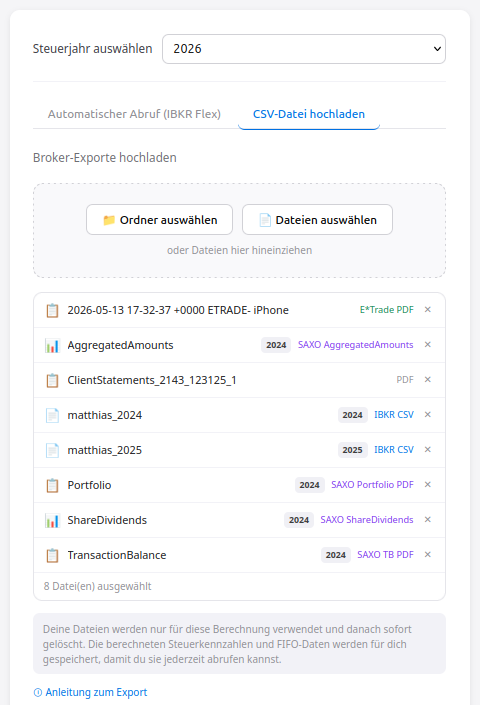
In der KapFrei Web-App (app.kapfrei.at) kannst du das Activity Statement CSV direkt hochladen. Unterstützt werden auch SAXO TransactionBalance PDFs und E*Trade PDFs — alles in einem einzigen Upload-Schritt, mehrere Broker gleichzeitig.

In the KapFrei web app (app.kapfrei.at) you can upload the Activity Statement CSV directly. SAXO TransactionBalance PDFs and E*Trade PDFs are also supported — all in a single upload step, multiple brokers at once.

KapFrei Datei-Upload — mehrere Broker-Exporte (IBKR CSV, SAXO PDF, E*Trade PDF) mit automatischer Broker- und Jahres-Erkennung
3

Berechnung starten — Ergebnisse in ~15 Sekunden

Start calculation — results in ~15 seconds

KapFrei verarbeitet alle hochgeladenen Dateien in einer zweiphasigen Pipeline: KZ-Ergebnisse erscheinen bereits nach ~15 Sekunden — noch während das Excel-Dashboard im Hintergrund generiert wird. Du siehst sofort, ob deine Daten vollständig sind, ohne auf den vollständigen Export warten zu müssen.

KapFrei processes all uploaded files in a two-phase pipeline: KZ results appear after ~15 seconds — while the Excel dashboard is still being generated in the background. You immediately see whether your data is complete, without waiting for the full export.

4

Ergebnisse & Datenlücken prüfen

Review results & data gaps

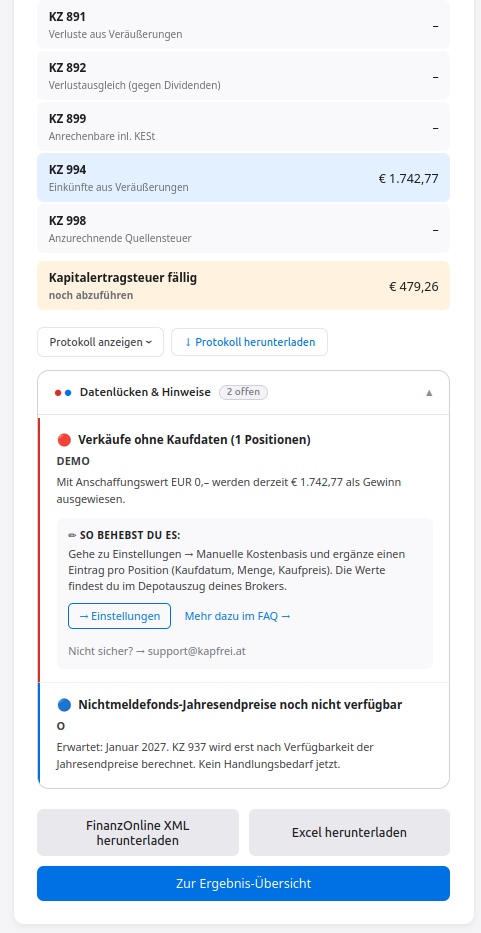
Unter den Kennzahlen zeigt KapFrei automatisch ein Datenlücken & Hinweise-Panel — dreistufig nach Handlungsbedarf:

Below the KZ figures, KapFrei automatically shows a Data gaps & notices panel — three tiers by urgency:

  • 🔴 Rot — Handlungsbedarf: z.B. Verkäufe ohne Kaufdaten — Anschaffungskosten wurden mit EUR 0,– angesetzt, der angezeigte Gewinn ist deshalb zu hoch. Mit direktem Link zu den Einstellungen. Red — action required: e.g. sells without purchase data — cost basis was set to EUR 0, the shown gain is therefore overstated. With direct link to Settings.
  • 🟡 Gelb — Näherung aktiv: z.B. SAXO TransactionBalance PDF fehlt — Kaufkosten wurden approximiert, Ergebnis ist annähernd korrekt. Yellow — approximation active: e.g. SAXO TransactionBalance PDF missing — cost basis was estimated, result is approximately correct.
  • 🔵 Blau — kein Handlungsbedarf: z.B. Nichtmeldefonds-Jahresendpreise fehlen noch (erwartet Jänner des Folgejahres). Blue — no action needed: e.g. non-reporting fund year-end prices not yet available (expected January of next year).
KapFrei Datenlücken & Hinweise — rotes Warnsymbol für fehlende Kaufdaten, blaues Symbol für noch nicht verfügbare Nichtmeldefonds-Jahresendpreise
5

FinanzOnline-XML herunterladen & eintragen

Download FinanzOnline XML & enter figures

Mit einem Klick lädst du das fertige XML herunter — es enthält alle E1kv-Kennzahlen strukturiert und mit Versionskennung. FinanzOnline unterstützt aktuell keinen direkten XML-Import für die E1kv; trage die Kennzahlen manuell in die Online-Maske ein. Das mitgelieferte Excel-Dashboard enthält zusätzlich vollständige Transaktions-, Dividenden- und Quellensteuer-Übersichten sowie ein Freedom-FIRE-Dashboard.

With one click you download the finished XML — it contains all E1kv KZ figures, structured and versioned. FinanzOnline currently does not support direct XML import for E1kv; enter the figures manually into the online form. The included Excel dashboard also contains complete transaction, dividend and withholding tax overviews plus a Freedom/FIRE dashboard.

Quellensteuer-Rückforderung — automatisch analysiert

Withholding tax reclaim — automatically analysed

Als österreichischer Anleger mit IBKR-Konto hast du in vielen Fällen zu viel Quellensteuer bezahlt. KapFrei erkennt automatisch, welche Länder mehr Quellensteuer einbehalten haben als das jeweilige Doppelbesteuerungsabkommen (DBA) erlaubt — und wie viel davon rückforderbar ist.

As an Austrian investor with an IBKR account you have in many cases overpaid withholding tax. KapFrei automatically detects which countries withheld more than their double taxation agreement (DBA) with Austria allows — and how much is reclaimable.

🇩🇪
Deutschland — BZSt §50c
Germany — BZSt §50c
26,375 % einbehalten; 15 % DBA-Limit → bis zu 11,375 % rückforderbar
26.375% withheld; 15% DTA limit → up to 11.375% reclaimable
🇫🇷
Frankreich — Cerfa 5000/5001
France — Cerfa 5000/5001
30 % einbehalten; 15 % DBA-Limit → 15 % rückforderbar
30% withheld; 15% DTA limit → 15% reclaimable
🇮🇪
Irland — DIRT auf Zinsen
Ireland — DIRT on interest
20 % DIRT auf IBKR-Zinsen; für AT-Ansässige vollständig befreit → 100 % rückforderbar
20% DIRT on IBKR interest; AT residents fully exempt → 100% reclaimable
🇩🇰
Dänemark — SKAT
Denmark — SKAT
27 % einbehalten; 15 % DBA-Limit → 12 % rückforderbar
27% withheld; 15% DTA limit → 12% reclaimable

KapFrei berechnet den rückforderbaren Betrag pro Land und Jahr — und erklärt, welche Formulare einzureichen sind. Kein manuelles Durchsuchen von DBA-Tabellen.

KapFrei calculates the reclaimable amount per country and year — and explains which forms to file. No manual lookup of tax treaty tables.

Häufige Fragen

Frequently asked questions

Alle Antworten zu IBKR, KESt-Berechnung, Meldefonds, Quellensteuer-Rückforderung und FinanzOnline findest du in unserem FAQ.

Find all answers about IBKR, KESt calculation, reporting funds, WHT reclaims and FinanzOnline in our FAQ.

FAQ ansehen → View FAQ →

Jetzt IBKR KESt berechnen — kostenlos

Calculate IBKR KESt now — free

Activity Statement hochladen, Kennzahlen erhalten, XML herunterladen. Kein Download, keine Installation — direkt im Browser.

Upload Activity Statement, get KZ figures, download XML. No download, no install — runs in your browser.

✓ Bereits mehrere Nutzer haben ihre KESt für 2025 mit KapFrei erfolgreich berechnet — mit dem Standard IBKR Activity Statement, auf Deutsch und auf Englisch.

✓ Several users have already successfully calculated their KESt for 2025 with KapFrei — using the standard IBKR Activity Statement, in German and in English.

Kostenlos starten → Get started free → Anleitung ansehen → View guide →